 MyEExcel! MyEExcel!
One of the many benefits of being a Club of Excellence Member is setting up your own personal MyEExcel website! On your website, your customers can order products when they want to online, and it saves you from having to arrange to deliver the products because E. EXCEL ships their products directly to them. And, of course, you earn Commission on everything your customers purchase on your MyEExcel site!
Setting up your website in the Business Center is simple. Place the cursor over MyEExcel.com in the top menu bar. When you do, a drop-down list appears. Click each of these items in turn, and complete the resulting screens.
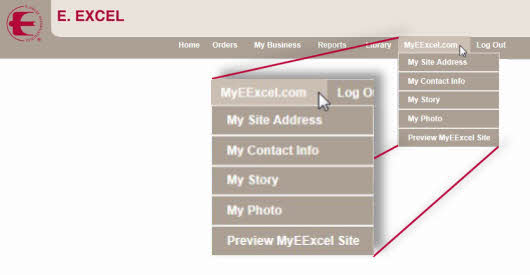
1. My Site Address: In this section you will be asked to select a name for your website. Names are screened by E. EXCEL and if a name is selected that contains anything objectionable by government regulations or civility, it will be rejected. If a name is rejected, you will be asked to select a new name for your site.
2. My Contact Info: In this section you are asked to select how customers may contact you. You may elect to use several different contact methods or one only.
3. My Story: This section allows you to introduce yourself and tell why you are part of E. EXCEL, or your story. You may enter any information you like, but again, the story will be screened, and if any objectionable language is found, it will be rejected and you will be asked to resubmit your story.
4. My Photo: If desired, you may enter a personal photo in this section, or use the default image selected by E. EXCEL. The current default image is shown below.

Pictures are screened for inappropriate images, and if one is found, you will be asked to resubmit an appropriate image.
Click Preview MyEExcel Site once you have completed these four steps for a view at what your site will look like when it becomes live. MyEExcel sites only become live after having been screened, which usually only takes a few days.
E. EXCEL does provide written instructions for setting up your MyEExcel site. In the Business Center library under the heading Learning About Your Business Center, select 5. MyEExcel Sites
to access these instructions. This PDF is also located in the right column above for your convenience. |